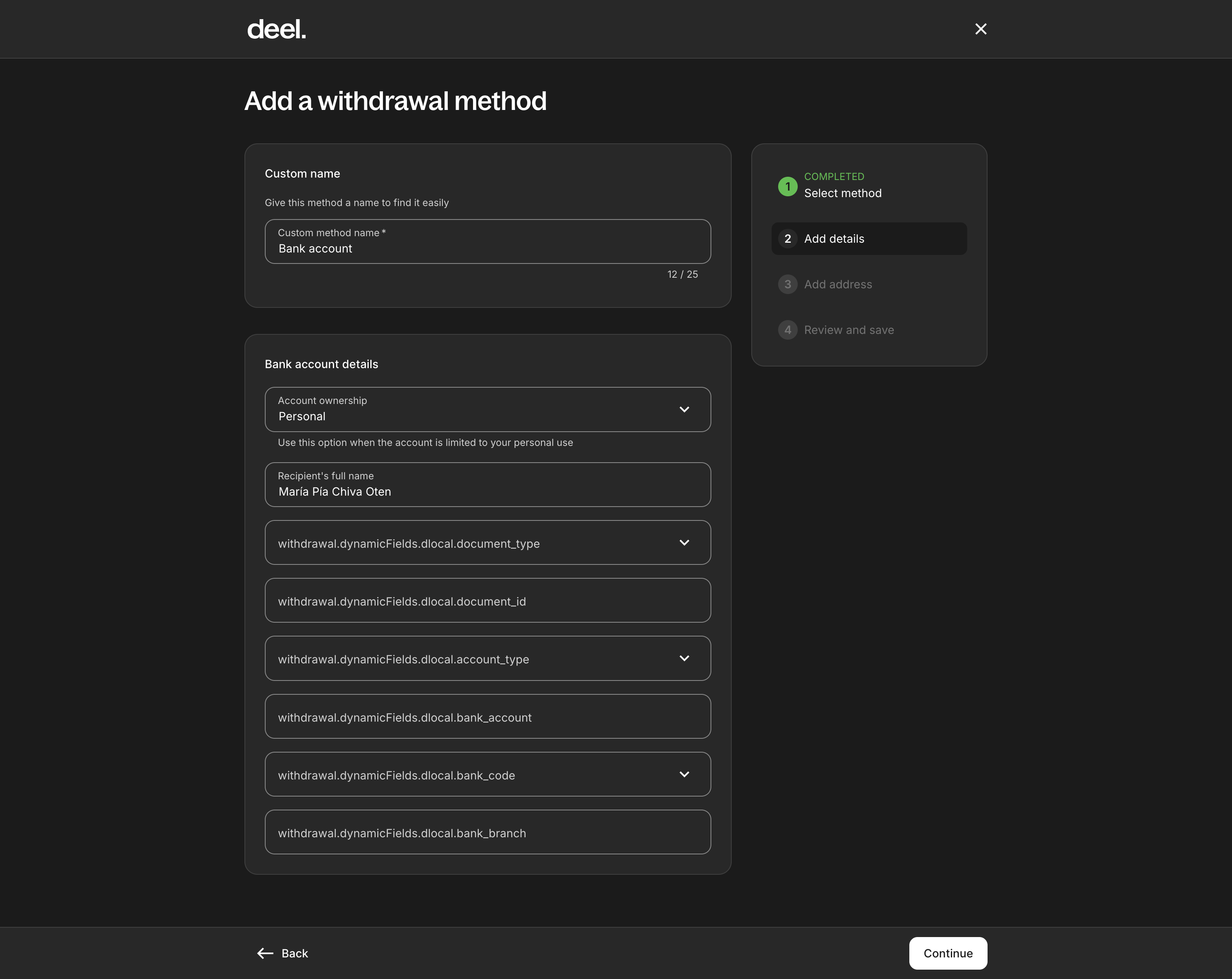
When trying to add a Local Bank Account withdrawal method for Uruguay, in step “Add details”, the fields display internal keys instead of user-friendly labels. This breaks usability since users don’t know what information to provide.
Steps to Reproduce:
-
Go to
Add a withdrawal method. -
Select Local Bank Account.
-
Proceed to step 2 (Add details).
-
Check the field labels.
Actual Result:
Fields show system keys instead of labels, e.g.:
-
withdrawal.dynamicFields.dlocal.document_type -
withdrawal.dynamicFields.dlocal.document_id -
withdrawal.dynamicFields.dlocal.account_type -
withdrawal.dynamicFields.dlocal.bank_account -
withdrawal.dynamicFields.dlocal.bank_code -
withdrawal.dynamicFields.dlocal.bank_branch
Expected Result:
Fields should display proper user-friendly labels, for example:
-
Document Type
-
Document ID
-
Account Type
-
Bank Account
-
Bank Code
-
Bank Branch
Severity: High – Blocks the user from completing the withdrawal method setup properly.